What is Object Oriented Programming?
Object Oriented programming (OOP) is a programming paradigm that relies on the concept of classes and objects. It is used to structure a software program into simple, reusable pieces of code blueprints (usually called classes), which are used to create individual instances of objects.
A class is an abstract blueprint used to create more specific, concrete objects. Classes often represent broad categories, like Car or Dog that share attributes. These classes define what attributes an instance of this type will have, like color, but not the value of those attributes for a specific object.
Classes can also contain functions, called methods available only to objects of that type. These functions are defined within the class and perform some action helpful to that specific type of object.
Class templates are used as a blueprint to create individual objects. These represent specific examples of the abstract class. Each object can have unique values to the properties defined in the class.
Benefits of OOP
- OOP models complex things as reproducible, simple structures
- Reusable, OOP objects can be used across programs
- Allows for class-specific behavior through polymorphism
- Easier to debug, classes often contain all applicable information to them
- Secure, protects information through encapsulation
How to structure OOP programs?
Imagine running a dog sitting camp, with hundreds of pets, and you have to keep track of the names, ages, and days attended for each pet. How would you design simple, reusable software to model the dogs?
With hundreds of dogs, it would be inefficient to write unique code for each dog. Below we see what that might look like with objects rufus and fluffy.
js
As you can see above, there is a lot of duplicated code between both objects. Grouping related information together to form a class structure makes the code shorter and easier to maintain.
In the dogsitting example, here’s how a programmer could think about organizing an OOP:
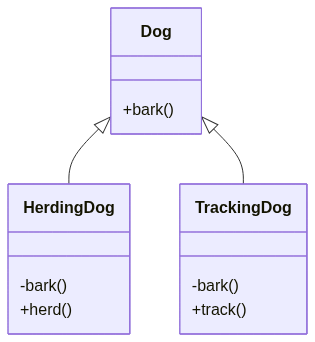
- Create a parent class for all dogs as a blueprint of information and behaviors (methods) that all dogs will have, regardless of type.
- Create child classes to represent different subcategories of dog under the generic parent blueprint. 3. Add unique attributes and behaviors to the child classes to represent differences 4. Create objects from the child class that represent dogs within that subgroup
Building blocks of OOP
- Classes
- Objects
- Methods
- Attributes
Classes
Classes are where we create a blueprint for the structure of methods and attributes. Individual objects are instantiated, or created from this blueprint. Classes contain fields for attributes, and methods for behaviors.
js
Objects
Objects are instances of classes created with specific data, for example in the code snippet below Rufus is an instance of the Dog class.
js
Methods
Methods represent behaviors. Methods perform actions; methods might return information about an object, or update an object’s data. The method’s code is defined in the class definition.
Attributes
Attributes are the information that is stored. Attributes are defined in the Class template. When objects are instantiated individual objects contain data stored in the Attributes field.
Four Principles of OOP
- Inheritance: child classes inherit data and behaviors from parent class
- Encapsulation: containing information in an object, exposing only selected information
- Abstraction: only exposing high level public methods for accessing an object
- Polymorphism: many methods can do the same task
Inheritance
Inheritance allows classes to inherit features of other classes. Put another way, parent classes extend attributes and behaviors to child classes. Inheritance supports reusability.
The benefits of inheritance are programs can create a generic parent class, and then create more specific child classes as needed. This simplifies overall programming, because instead of recreating the structure of the Dog class multiple times, child classes automatically gain access to functionalities within their parent class.
js
Encapsulation
Encapsulation means containing all important information inside an object, and only exposing selected information to the outside world. Attributes and behaviors are defined by code inside the class template.
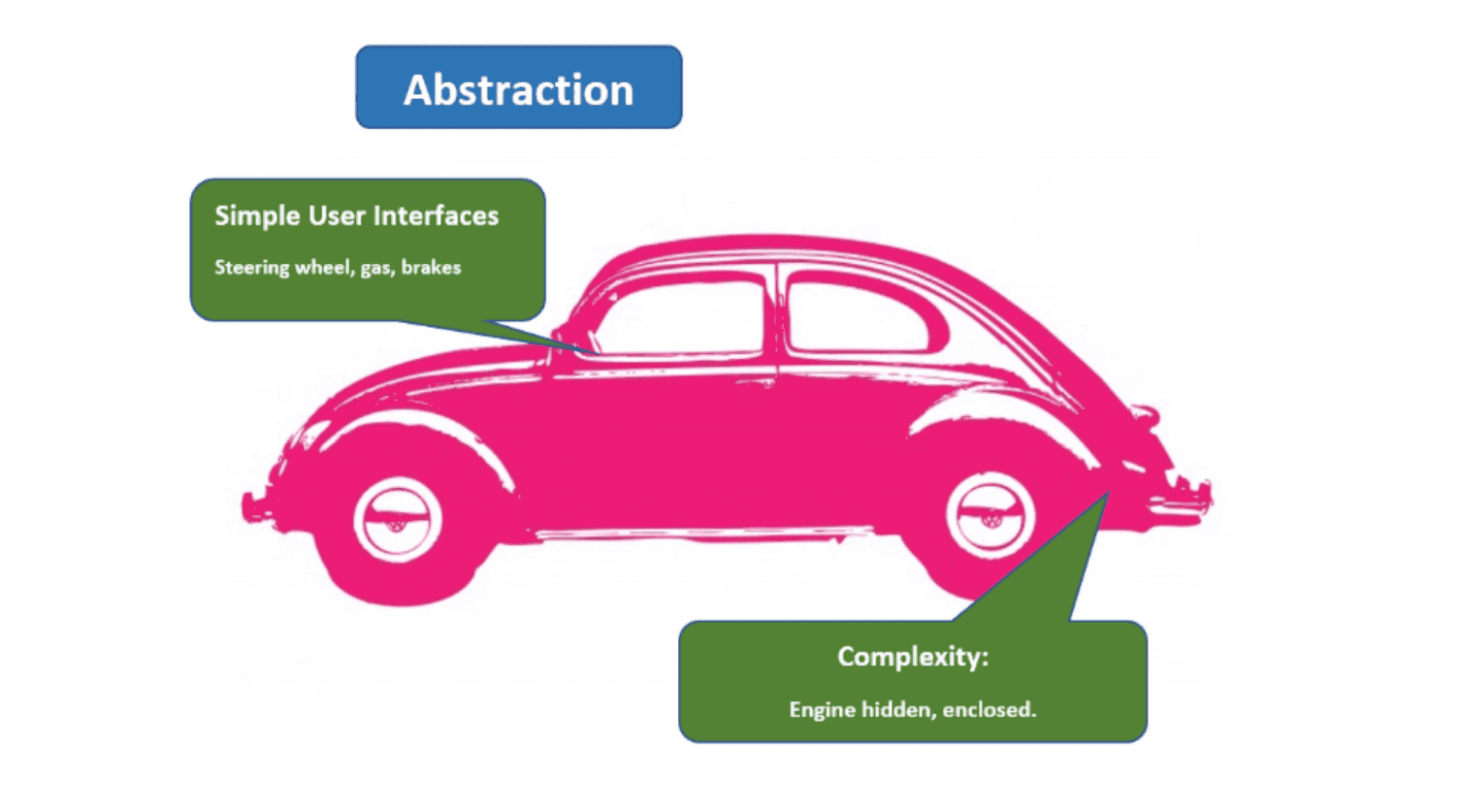
Let’s use a car as a metaphor for encapsulation. The information the car shares with the outside world, using blinkers to indicate turns, are public interfaces. In contrast, the engine is hidden under the hood.

Encapsulation adds security. Attributes and methods can be set to private, so they can’t be accessed outside the class. To get information about data in an object, public methods & properties are used to access or update data.
Abstraction
Abstraction means that the user interacts with only selected attributes and methods of an object. Abstraction uses simplified, high level tools, to access a complex object.
Polymorphism
Polymorphism means designing objects to share behaviors. Using inheritance, objects can override shared parent behaviors, with specific child behaviors. Polymorphism allows the same method to execute different behaviors in two ways: method overriding and method overloading.
Method Overriding
js
Method Overloading
js
Classes API Reference
A constructor function is initialized with a number of parameters, which would be assigned as properties of this, referring to the function itself. The first letter of the identifier would be capitalized by convention.
js
Defining class methods
js
Extending classes
An advantageous feature of constructor functions and classes is that they can be extended into new object blueprints based off of the parent. This prevents repetition of code for objects that are similar but need some additional or more specific features.
js
Static methods and properties
Neither static methods nor static properties can be called on instances of the class. Instead, they’re called on the class itself.
Static methods are often utility functions, such as functions to create or clone objects, whereas static properties are useful for caches, fixed-configuration, or any other data you don’t need to be replicated across instances.
js
Private and Public Methods/Properties
Class fields are public by default. You can mark properties as private using the #. Private members are not native to the language before this syntax existed.
js
Abstract classes and methods
Define an abstract class in Typescript using the abstract keyword. Abstract classes are mainly for inheritance where other classes may derive from them. We cannot create an instance of an abstract class.
An abstract class typically includes one or more abstract methods or property declarations. The class which extends the abstract class must define all the abstract methods.
js
Javascript has no native way to implement abstract classes/methods. We can however, use a workaround to get the desired effect:
js