#5 Client Side Routing (SPA)
By the end of this section, you should understand how frameworks are handling client side routing.
Routing options
Traditional Full Page Reload
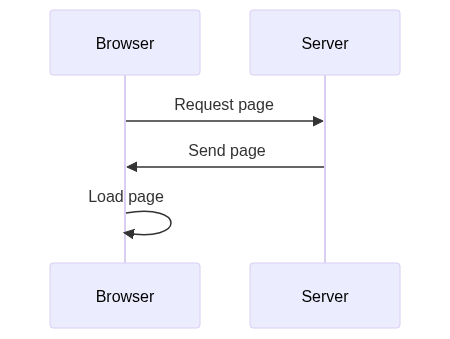
- Traditional Full Page Reload: The browser requests a page from the server, which sends back the full page content, causing the browser to fully reload the page.
Client-side Routing with History API
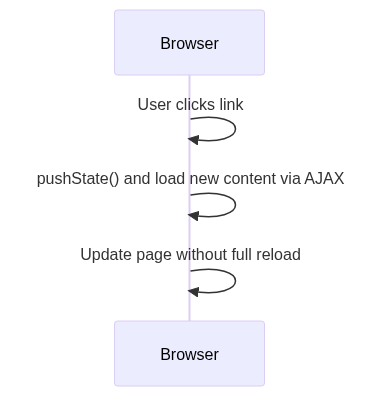
- Client-side Routing with History API: Using the History API, new page content is loaded via AJAX, and the browser URL and content are updated without a full page reload, providing a smoother user experience.
Mixed Client-Server Routing
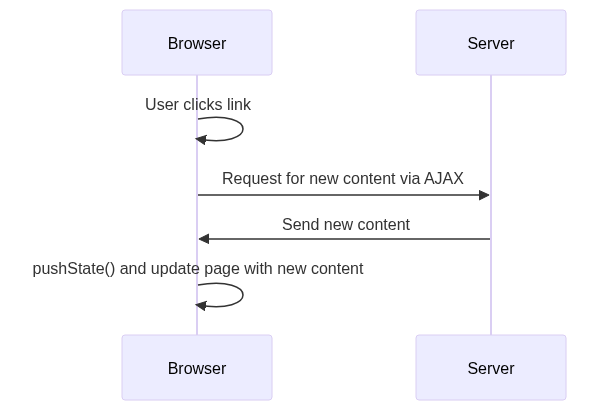
- Mixed Client-Server Routing: A combination where new content is requested from the server, received, and then the page is updated using the History API, enabling a more dynamic page update without a full reload.
Using The History API
- JavaScript’s History API enables manipulation of the URL and browser history.
history.pushState()allows for changing the URL without refreshing the page.- Listening for URL changes can be done using the
popstateevent, and based on these changes, different content can be displayed.
javascript// Navigating to a new pagefunction navigateToPage() {history.pushState({ page: "newPage" },"New Page", // This argument is ignored, can be anthying like null or undefined"/new-page",)}// Handling back and forward buttonswindow.onpopstate = function (event) {if (event.state) {loadPage(event.state.page)}}// Function to load a new page contentfunction loadPage(pageName) {// Load the page content hereconsole.log("Loading", pageName)}
Project progress
/services/Router.js
javascriptconst Router = {init: () => {document.querySelectorAll("a.navlink").forEach((a) => {a.addEventListener("click", (event) => {event.preventDefault()const href = event.target.getAttribute("href")Router.go(href)})})// Process initial URLRouter.go(location.pathname)window.addEventListener("popstate", (event) => {Router.go(event.state.route, false)})},go: (route, addToHistory = true) => {if (addToHistory) {history.pushState({ route }, "", route)}let pageElement = nullswitch (route) {case "/":pageElement = document.createElement("h1")pageElement.textContent("Menu")breakcase "/order":pageElement = document.createElement("h1")pageElement.textContent("Menu")breakdefault:if (route.startsWith("/product-")) {pageElement = document.createElement("h1")pageElement.textContent("Details")pageElement.dataset.productId = route.substring(route.lastIndexOf("-") + 1,)}break}if (pageElement) {document.querySelector("main").innerHTML = ""document.querySelector("main").appendChild(pageElement)}window.scrollX = 0},}export default Router
And let’s import this new service from app.js and call it from DOMContentLoaded
javascriptimport Router from "./services/Router.js"window.addEventListener("DOMContentLoaded", () => {app.router.init()loadData()})