What is an API?
How are they similar to contracts?
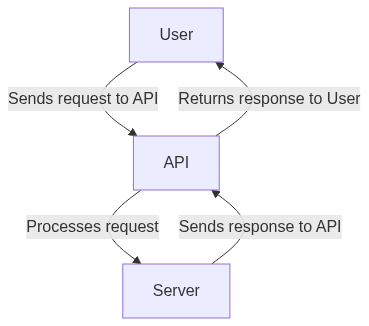
In web development, an API (Application Programming Interface) is a set of protocols, routines, and tools for building software and applications. It provides a way for two different software applications to communicate with each other and exchange information or data.
APIs are similar to contracts in that they establish a set of rules and expectations between two parties. In the case of APIs, the parties involved are the software application and the developer who wants to access the application’s data or functionality. The API defines the rules of how the two applications can communicate with each other, what kind of data can be exchanged, and how it should be structured.
For example, let’s say you are a developer building a mobile application that needs to retrieve data from a weather forecasting service. The weather forecasting service would have an API that you can use to access their data. The API would define the rules and expectations for how your mobile application can communicate with their service. This might include rules such as the format in which you can request data, the type of data that can be returned, and how often you can make requests.
Just like a contract, an API is a formal agreement that sets expectations and establishes rules for how two parties will interact with each other. By using APIs, developers can create applications that can easily communicate with other applications and services, which can help to speed up development and reduce the likelihood of errors or compatibility issues.
Swagger
Swagger is a tool for designing, documenting, and testing APIs. It provides a way for developers to create a clear and organized documentation of their APIs, which can help other developers understand how to use the API, what data can be retrieved or sent, and what errors can occur.
Swagger does this by using a standardized format called the OpenAPI Specification. The OpenAPI Specification defines a structured way of describing APIs, including information such as endpoints, parameters, responses, and authentication methods.
Here’s an example of a Swagger documentation for an API that works with Pokemon:
yaml
In this example, the Swagger documentation describes an API for retrieving information about Pokemon. Among others, it defines an endpoint /pokemon/{id} that accepts an ID parameter and returns information about a specific Pokemon.
The Swagger documentation also defines the expected responses, including a successful response with the Pokemon object, as well as a 404 error if the Pokemon is not found.
Overall, Swagger provides a clear and organized way to document APIs, making it easier for developers to understand and use the API.
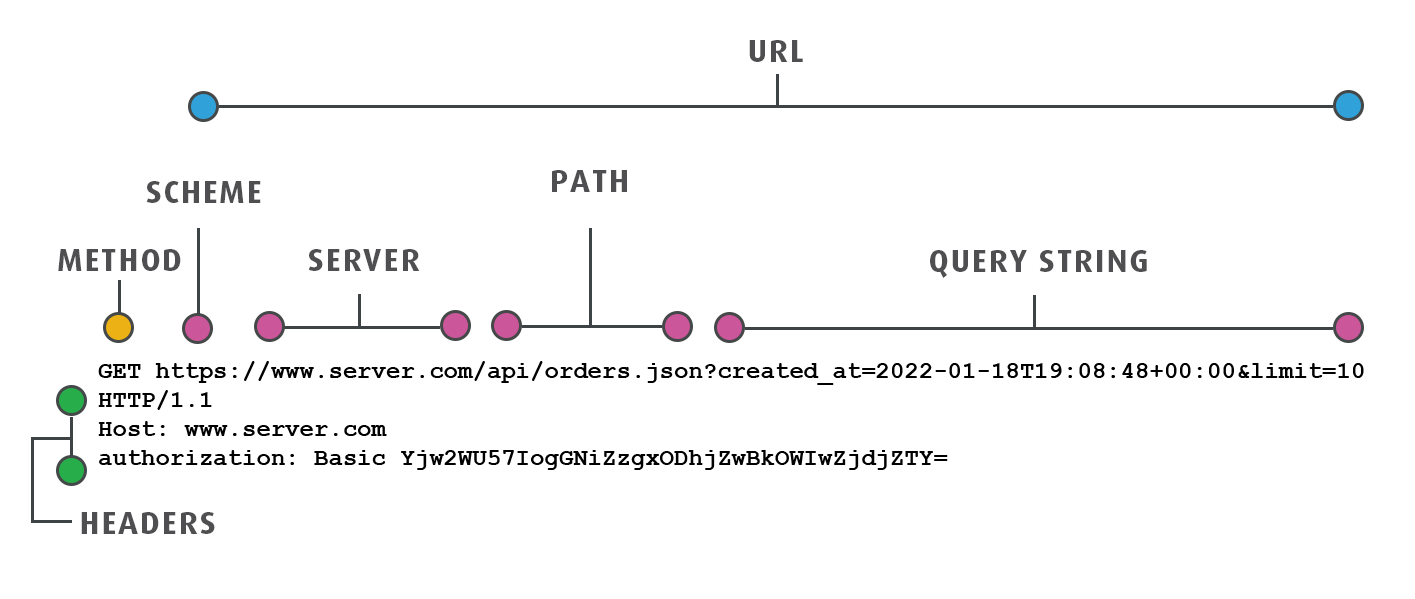
Anatomy of an HTTP request
-
Request method: The HTTP method used for the request, such as GET, POST, PUT, DELETE, etc.
-
Request URI: The Uniform Resource Identifier (URI) that identifies the resource on the server that the client wants to interact with.
-
Request headers: Additional metadata about the request, such as the content type, authentication credentials, and caching instructions.
-
Request body: The optional data that is sent along with the request, typically used for POST and PUT requests to send data to the server.
-
Query parameters: Optional parameters that can be included in the URI to provide additional information about the request, such as filters or pagination options.
-
Host: The domain name or IP address of the server that the client is making the request to.
Here’s an example HTTP request for retrieving a list of users:
bash
In this example, the client is sending a GET request to the /api/users endpoint with two query parameters: status=active and sort=name. The request includes several headers, such as the user agent and authorization token. Finally, the request includes an optional request body in JSON format with data about a new user to create.
HTTP status codes
| Status | Code Meaning |
|---|---|
| 200 | OK |
| 201 | Created |
| 204 | No Content |
| 400 | Bad Request |
| 401 | Unauthorized |
| 403 | Forbidden |
| 404 | Not Found |
| 405 | Method Not Allowed |
| 500 | Internal Server Error |
| 502 | Bad Gateway |
| 503 | Service Unavailable |
ExpressJS Fundamental Concepts
1. Routing
In Express JS, Routing determines an application’s response to the client’s request to a specific endpoint, a URI (or path), and a specific HTTP request method.
Each route contains one or more handler functions and is executed when the route is matched.
 Theme: Following is the structure of Routing
app.METHOD(PATH, HANDLER)
Where:
- The app is an express’s instance.
- METHOD is an HTTP request method
- PATH is a server’s path
- HANDLER is a callback function executed when the matching route is found.
You can use four HTTP methods within the request. These methods help in identifying the function made by the user. Let’s learn about each HTTP method in detail:
- GET: The HTTP GET method helps retrieve information from the server using a given URI. The GET requests only retrieve data without causing any other effect on the data.
- POST: The HTTP POST request method sends data to a server or updates a resource.
- PUT: The HTTP PUT request method helps accept the data enclosed within the request as an alteration to the current object specified by the URL.
- DELETE: This method requests the server to delete a particular resource from the destination.
The following example illustrates the usage of all HTTP methods:
js
2. Middleware
In Express, Middleware functions are the functions that have access to the response object (res) and request object (req), along with the following function in the application’s request-response cycle.
The following function is a function that, when invoked, operates the Middleware succeeding the existing Middleware.
The Middleware performs the following tasks:
- Code execution
- Perform modifications to the response and request objects.
- End applications request-response cycle.
- Call the succeeding Middleware existing in the cycle.
The below image illustrates the elements of a middleware function call:

An Express application can use the following types of Middleware:
- Application-level Middleware
- Third-party Middleware
- Built-in Middleware
- Router-level Middleware
Application-level Middleware
You can use application-level Middleware to access an app object’s instance using the app.use() and app.METHOD() functions, where METHOD is the HTTP request method that handles middleware functions like GET, POST, or PUT in lowercase.
The following examples depict a middleware function with no mount path. For every request made by the app, this function is executed.
js
The below example displays a middleware function mounted on the /user/:id path.
js
Router-level Middleware
This Middleware works exactly as application-level Middleware, except it is bound to an instance of Express.Router().
js
Router-level middleware is loaded using the router.use() and router.METHOD() functions.
The following is an example of Router-level Middleware:
js
Built-in Middleware
Following are the built-in middleware functions of Express:
-
express.static serves static assets such as images, HTML files, etc.
-
Express.json analyzes incoming requests with JSON payloads.
-
Express.urlencoded parses inbound requests that include payloads encoded with the URL.
-
Third-party Middleware
To give Express apps more functionalities, use third-party Middleware.
Install the Node.js module, then load it into your project at the router or application level.
sh
The following example demonstrates how to install and load the cookie-parsing using Middleware:
js
3. Template Engines
The template engine’s primary function is enabling the application’s status template file usage. It replaces variables with actual values in a template file and modifies the template into an HTML file transferred to the client. This approach makes designing HTML pages easier.
Mustache, Pug, and EJS are some popular template engines that work with Express. By default, the Express generator uses Jade, along with others.
This is Pug:
4. Error Handling
The process of catching and processing errors synchronously and asynchronously in Express is called Error Handling. By default, Express comes with support for the error handler, so you don’t need to write your own to get started.
In Express, Middleware manages error handling. Compared to other middleware functions, the error handling middleware must have four arguments instead of three – err, req, res, next.
Let’s see an example of how to send a response to any error -
js
Practice
Let’s create the API described in the swagger above within an express application. Ignore the database for now, just use some middleware, error handling and status codes.
You can find the codesandbox with a completed example here.